Tuesday, March 29, 2011

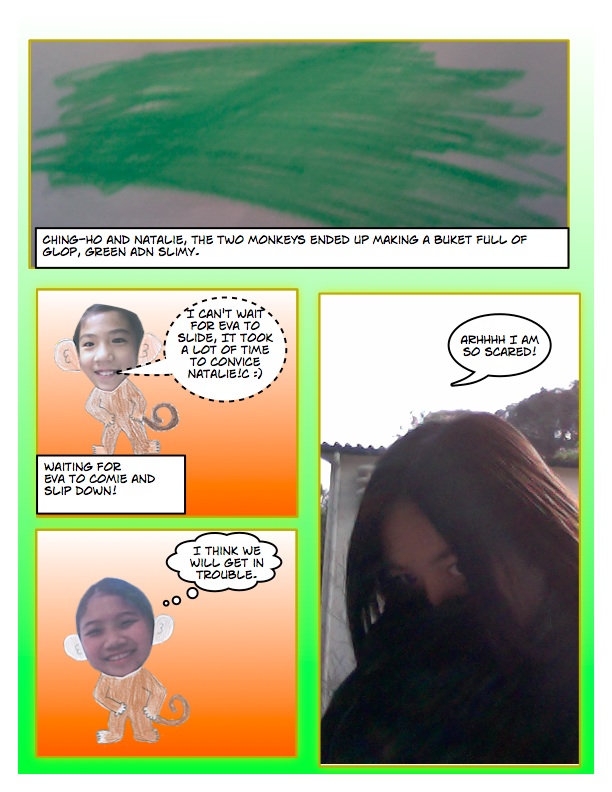
Eva And The Two Cheeky Monkeys

In ICT we all have to work  in groups of two to create a comic in comic life it can be about anything that is suitable for students to read, we all made some very interesting comics.  Our comic is about Eva and the two cheeky monkeys.  It talks about Eva going to a magic school and she meet the two cheeky monkeys, the monkeys always make fun of her.  At last she found something on the floor then and she ate it, suddenly she became a monkey too.  Hope you will like our comic!


HOPE YOU ENJOYED IT!


Tuesday, March 1, 2011

Lecture

In this lesson we talked about the internet, the video below is an example of how the internet works.  We took some notes about the internet and there are different examples:

1)There are different process for the internet to work: Packet switching, Network of Network, TCP/ IP.  
In School there are lots of networks and the internet connect  all the network together, they connected  by using the IP Address.  There are also Packets going one by one every single day they are called Packet switching, when they get to another side the computer can use it to get it work. This whole system is called Network to network. 

2)If someone takes a photo and he wanted to put it on Facebook, he connects it to his laptop to the school sever but it turns to be connecting others networks.  He put the photo to his laptop and uploads it on to Facebook.  Then his computer  finds Facebook's IP address, which it is located on the internet.  It splits the photo into Packets and it sends onto the network.  The Packets can go anywhere but if the packets gets lots or a network link goes down the TCP will find an different way or resend it packet again.  When all the packets gone there, then the photo will be finished and it will be post on Facebook.  Then that is called Network to network and they used TCP or IP.

Tuesday, February 22, 2011

Comic Strip

This is a comic strip from Snoopy, I post this comic because we are studying on comic.  There are some improtant things that you needed to know about comics:   
  • Genre: comedy, horror, war and spy.
  • Tittle: Snoopy, Spongebob Squarepants, Young Love and Lola.
  • Features: Onomatopoeia, Speech bubbles and colour.
  • Audiences: Kids, Teen and any age.
If you wanted to learn more about comics you can also go on this website: http://www.ichk.edu.hk/wiki/images/1/1f/7.1_Comic_Mind_Map.png


Thursday, November 11, 2010

Podcasting

In these few weeks, we learnt about podcast.  Podcast means a audio folder but is not a radio but you can download it on to MP3 and others.......  
This is some step that you may cover in the future:
1. To find a podcast it can be any thing For example: annoying orange I used someone's blog to put the podcast to a link, this is the link that I used:http://zhdrocks.blogspot.com/ Click on the 'Link' to see more.

2.Then you will see a very small sign click on it  it looks like a orange square with white  a half a circle and a small white dot in it and it called the RSS feed button.

3.Next copy the feed link by doing command 'c' after clicking it then there will be a link this was my link:
5. At the top left there is a thing called 'add a Subscription' click on it then paste the link that you just copy by doing command 'v', for example:http://feeds.feedburner.com/AnnoyingOrange.

6.After when you finished click on the 'add' button and magic comes, listen to the podcast and enjoyed it, you can keep on add lots and lots of podcast as many as you want.

Hope these in formation helped you try and follow the steps enjoy!

Tuesday, October 26, 2010

Case Studies

In these days lot of people creates blogs or go on blogs.  Blog has good things about it but it also got bad things about it, here are some example that we can avoid form it:
-Douglas High School student, got arrested after he represented as existing issued one that is to see giving care as a possible danger in MySpace.
-Landon has been missed class time, been subjected and his damages in excess of $100,000,” the an action said.


Hope these points help to BE MORE CARFUL of the blog lots of people got in trouble in lot of these cases! 

Sunday, October 24, 2010

Last summary project

In this Project I have learnt a lot of things.  I created a blog because we can share content with an audience. They could include of text, video, audio, links and more like works and assessments.  Inside your  blog you will see different kinds of things such as: putting label's and posting all sorts of stuff like: a welcome post.


Here are some tips that can help you in a blog.  There are good things and bad things here are some of them good things about blogs!
what things are the good things in the blogs:
-People can see what you have done.
-Can share it to other for checking work.
-You can comment on each others blogs.
-It will help me better with the technical stuff.
There are also bad things about blogs:
-If you put full name or anything that is personal information because people will find out who you are.
-Don't write anything that is informal.
These are the bad and good things about the blog I hope it is helpful for you!

In a blog there will be post and sidebar:
Sidebar-keeps thing forever.
Post area-where you post your work.


I also learnt a lot of things such as the means of some words:
Embed - the steps of an object from one site into another
Widget - the stuff being inserted  


Putting images on the posts was also one of the thing that I learnt here are the steps of how you can put images in your own blog, first find the image that you wanted to put on the post, second drag the image on to the desktop, next on the top it said 'Link' next to the 'Link' there is a picture click on that.  Then click on the 'choose file' on the top middle, after then click on the image an click 'choose' at last click the 'add selected' finally the image that you wanted will show up.


Sometime I also put links in my post to make people know what I am talking about and it makes it more interesting by doing that you need to have a subject on what you are talking about for example: the subject I am doing is 'Spongebob' this is the website for 'spongebob' to let people learn more about it: http://spongebob.nick-asia.com/en/.
If you wanted to do something like the link here is what you do:
1. Click on the 'LINK' on the top middle.
2. Then it said 'To what URL should this link go?'
3.put the website there and click on 'OK'
4. Then the link will show up like this: http://spongebob.nick-asia.com/en/

If any of my friends or families wanted to open a blog I will help them.  After finishing this blog I felt very excited and fun because in this activity we worked together very well by helping each others and I am excited because I can't wait until what is our next project!



Thursday, September 30, 2010

5 Facts About Google

Our teacher told us to write 5 facts about google by using this website: http://www.google.com/help/basics.html to find more information.  These are my 5 facts about google searching:
-Everything that you type matters because id you type 'Sandwiches' it maybe shows 'sand' and 'which'.  Which as in which one is mine?
-Keep every thing you type simply.
-Putting double quotes('''') around the word or words that you wanted to search like this:['it will be much more easier.
-If you wanted to find definitions of words you can add a 'Define:' to find the definition easier.
-Add a - to less down the information like this: 'chocolate milk'-ice-cream. 


These are all of the 5 facts about google hope these things help you to search faster.